Webhooks
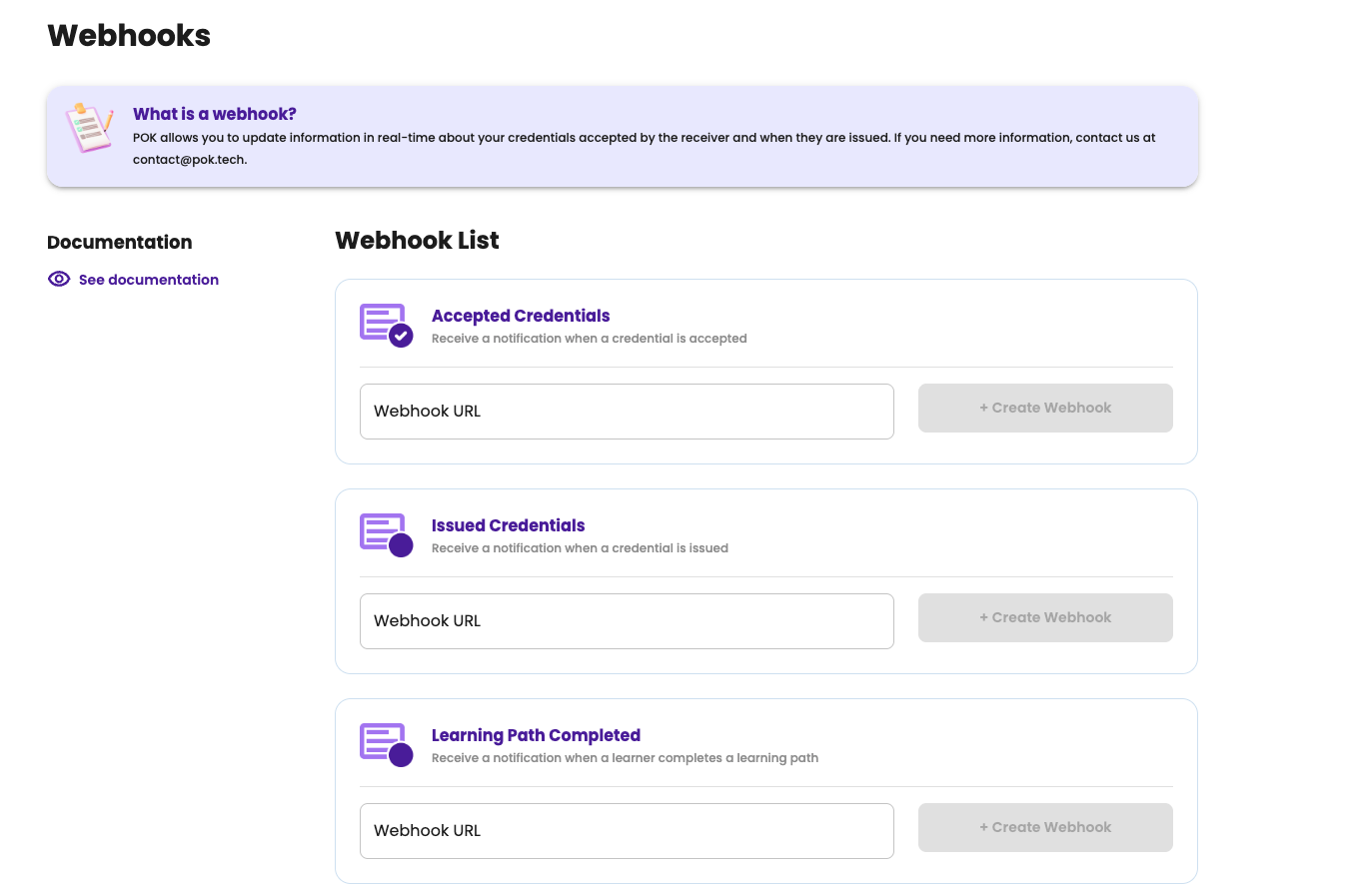
Organizations can provide URLs where PoK will make a request when a certain event happens. These URLs are configured in the user's settings, in the Webhooks section.
Expected requests
PoK will be executing HTTP requests with POST method, with two custom request parameters for message integrity verification. This is the recommended way to ensure a request came from the platform and hasn't been altered.
Authorization
Requests will also contain the Authorization header; the value being the prefix 'Basic ' followed by the base64-encoded concatenation of pok: and the shared secret for your webhook. Use this method if you get it for free or if you're unable to verify message signatures.
Content type
The body will be a UTF-8 encoded JSON payload. The Content-Type header will be reflecting that.
Message validation
The integrity of a message sent by PoK, as well as the guarantee that it was issued by PoK itself, can be achieved by verifying the signature. Since only PoK and you know the signing key, only one another can sign and verify any payload for authenticity and integrity.
Message integrity
- Get the value of the X-Pok-Request-Timestamp header
- Get the value of the X-Pok-Signature header
- Get the full request body, unaltered, as a string
- Get a SHA512 HMAC using your webhook's signing key
- Concatenate the values of X-Pok-Request-Timestamp and body, joined by a single . character
- Calculate the HMAC digest for that string, in HEX
- Compare the result with the X-Pok-Signature value. They must match or be rejected
A sample TypeScript code snippet for this follows.
import { IncomingMessage } from 'http';
import crypto from 'crypto';

const WEBHOOK_SIGNING_KEY = '...';

function verifySignature(request: IncomingMessage, body: string): boolean {
    // sample content type: application/json;charset=utf-8
    const charset = request.headers['Content-Type'].split(';charset=')[1] as crypto.Encoding;
    const timestamp = request.headers['X-Pok-Request-Timestamp'];
    const serverSentSignature = request.headers['X-Pok-Signature'];

    const hmac = crypto.createHmac('sha512', WEBHOOK_SIGNING_KEY);
    hmac.update(`${timestamp}.${body}`, charset);
    return hmac.digest('hex') === serverSentSignature;
}
Prevent re-entry
The X-Pok-Request-Timestamp header value is the time of PoK's internal clock at the moment the message was sent, in milliseconds. It is possible to use this as a mechanism to prevent re-entry, by specifying a tolerance level and rejecting messages that surpass that value.
A sample TypeScript code snippet for this follows.
import { IncomingMessage } from 'http';

const TOLERANCE = 5 * 60 * 1000; // 5 min
function requestIsWithinExpectedTimeframe(request: IncomingMessage): boolean {
    const timestamp = request.headers['X-Pok-Request-Timestamp'];

    return new Number(timestamp).valueOf() + TOLERANCE >= new Date().getTime();
}
Webhook details
When you create a webhook, you'll see its details and available tools in a list.
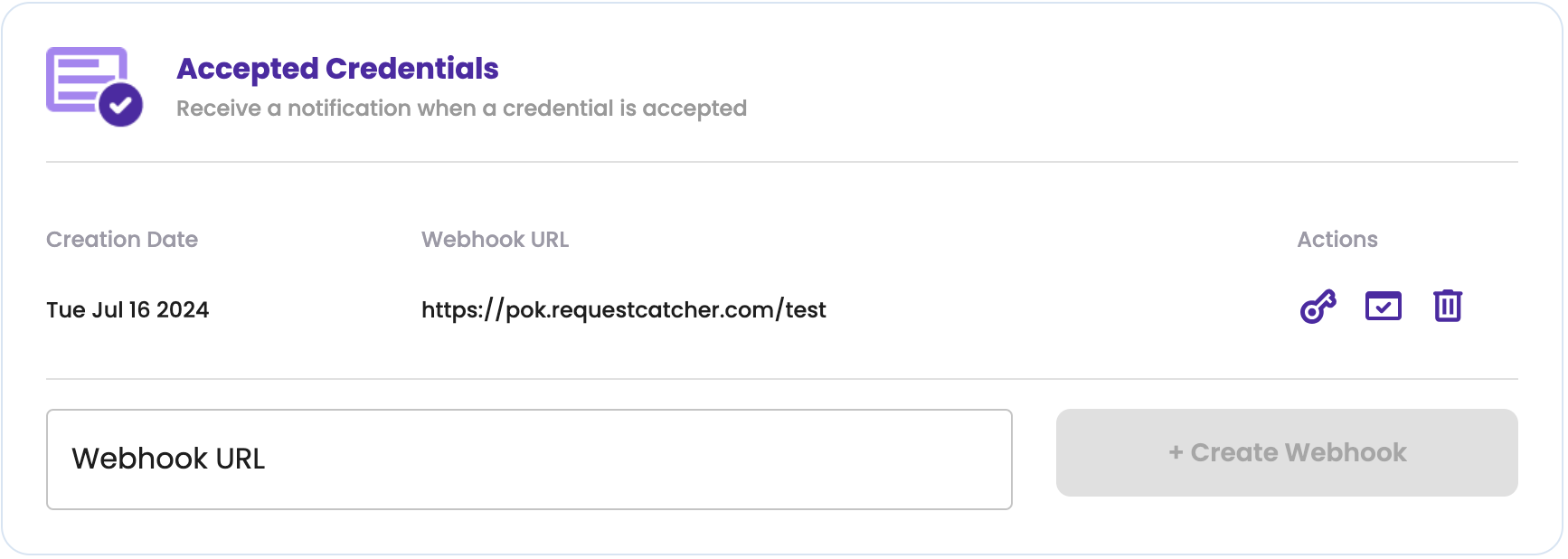
The key icon shows the keys for that specific webhook. These are important details for message validation.
The checkmark icon triggers sending a fully valid, although dummy, message to your webhook. This is intended to be used as a learning or testing tool. The first test you can do is create a webhook pointing to a RequestCatcher endpoint.
The trashcan icon deletes the webhook. This operation cannot be undone.
Webhook keys
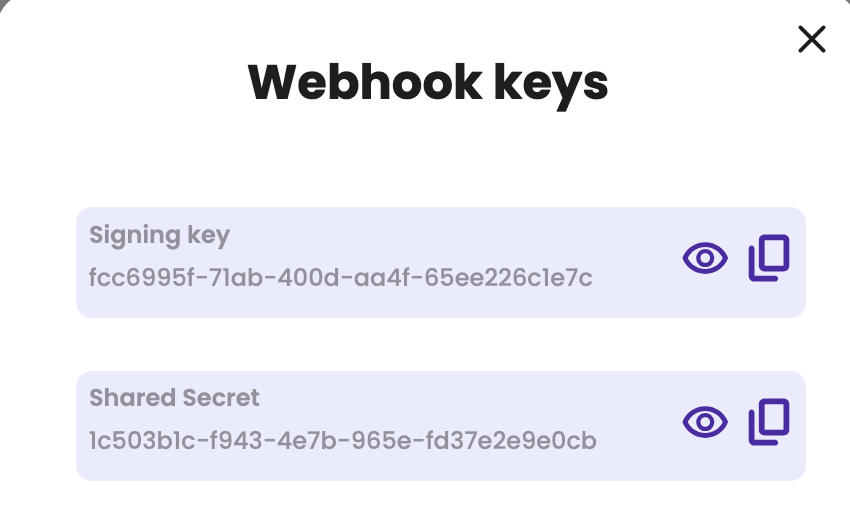
Each webhook has two secret keys. The signing key is used for integrity and the shared secret is used for authorization. While it is technically possible to integrate without either of these, it is strongly recommended that you implement at least one of them.
Payloads
Every payload names the type of event. Credential events also carry the id of the affected credential, so integrations can use the API endpoint to get its details. Learning path completions are about a path and a person instead, and are identified accordingly.
Accepted credential
This endpoint will be hit when a credential is accepted by the holder.
{
    "id": "a fake id for testing",
    "type": "credential-accepted"
}
Emitted credential
This endpoint will be hit when a credential is emitted. This means, it has been accepted by the holder, it has sent to its email address and, if it is a Blockchain certificate, the NFT for it has been minted.
{
    "id": "a fake id for testing",
    "type": "credential-emitted"
}
Electronic signature requested
This endpoint will be hit when a credential is waiting for an external electronic signature. This happens once any standard (PoK) signatures are complete, so the document is already in its final form.
This payload carries everything needed to sign the document, so you don't need to call the API to fetch it:
documents: the credential as aPDFand as aPNG, each as a pre-signed URL you can download directly. The PNG is the decrypted image (so the recipient's data is visible). These URLs expire 15 minutes after the event is sent, so download the documents promptly; if they expire, the issuer can re-send the request from PoK to get fresh URLs.signatures: one entry per electronic signer, with the signer'ssignerCodeandsignerNameand theboxwhere the signature should be placed.
The box is given in top-left pixel coordinates relative to the document's native size. The PDF embeds
the PNG full-page (same dimensions), so the same box applies to both documents. Any conversion your signing
provider needs (e.g. pixels → points, or flipping the Y axis to a bottom-left origin for PDF) is up to you.
{
    "id": "a fake id for testing",
    "type": "electronic-signature-requested",
    "documents": [
        {
            "type": "PDF",
            "url": "https://…pre-signed-url…",
            "signatures": [
                {
                    "signerCode": "17",
                    "signerName": "Jane Doe",
                    "box": { "x1": 100, "y1": 200, "x2": 300, "y2": 280 }
                }
            ]
        },
        {
            "type": "PNG",
            "url": "https://…pre-signed-url…",
            "signatures": [
                {
                    "signerCode": "17",
                    "signerName": "Jane Doe",
                    "box": { "x1": 100, "y1": 200, "x2": 300, "y2": 280 }
                }
            ]
        }
    ]
}
Learning path completed
This endpoint will be hit when a learner completes a learning path: they have earned every mandatory step, plus the minimum number of optional steps each module asks for.
There is no credential id here, because the event is not about one credential. It identifies the path and the learner, which is what the progress endpoint takes to tell you which steps they earned and whether the path awarded its final credential.
{
    "type": "learning-route-completed",
    "learningRouteId": "a fake learning route id for testing",
    "email": "test@example.com"
}
The event is sent on every completion, no matter how the path awards its final credential, so it does not
tell you whether anything is expected of you. The path does. Paths that hold their final credential for the
API report a completeParamsViaApi flag on the list and
the details endpoints; for those, this notification is your cue to
send the parameters. Call the complete final credential endpoint with the
learner's email and the values the template expects, and the credential is issued then. For every other
path the credential was already issued when the event was sent, and the notification is informational.
Because an event can be redelivered, that call is worth handling defensively. It answers 404 when nothing is waiting for that learner, and 409 when a credential was already created for them. Neither means the emission was lost, so read the credential's state instead of repeating the call. The learning paths page covers what each response means.