How to share my credential
You can share a POK Proof of Knowledge credential directly to your LinkedIn profile or feed, copy a public link, or send it by email. First, accept the credential from the email POK sends you, then unlock the certificate with your last name. Once it is unlocked, the sharing options become available.
Accept your credential
-
You will receive an email from POK asking you to accept your new certificate.
-
Click "Accept credential". A confirmation pop-up window appears.
-
POK then sends a second email with a link to your certificate. Click "View Certificate".
Unlock your certificate
The certificate opens in POK in encrypted form. To decrypt it, enter the last name under which the certificate was issued and click "Validate".
Once your last name is validated, the "Download" and "Share" options become active. "Download" saves the certificate to your device.
Share your credential
Click "Share" to see the available options.
Add it to your LinkedIn profile
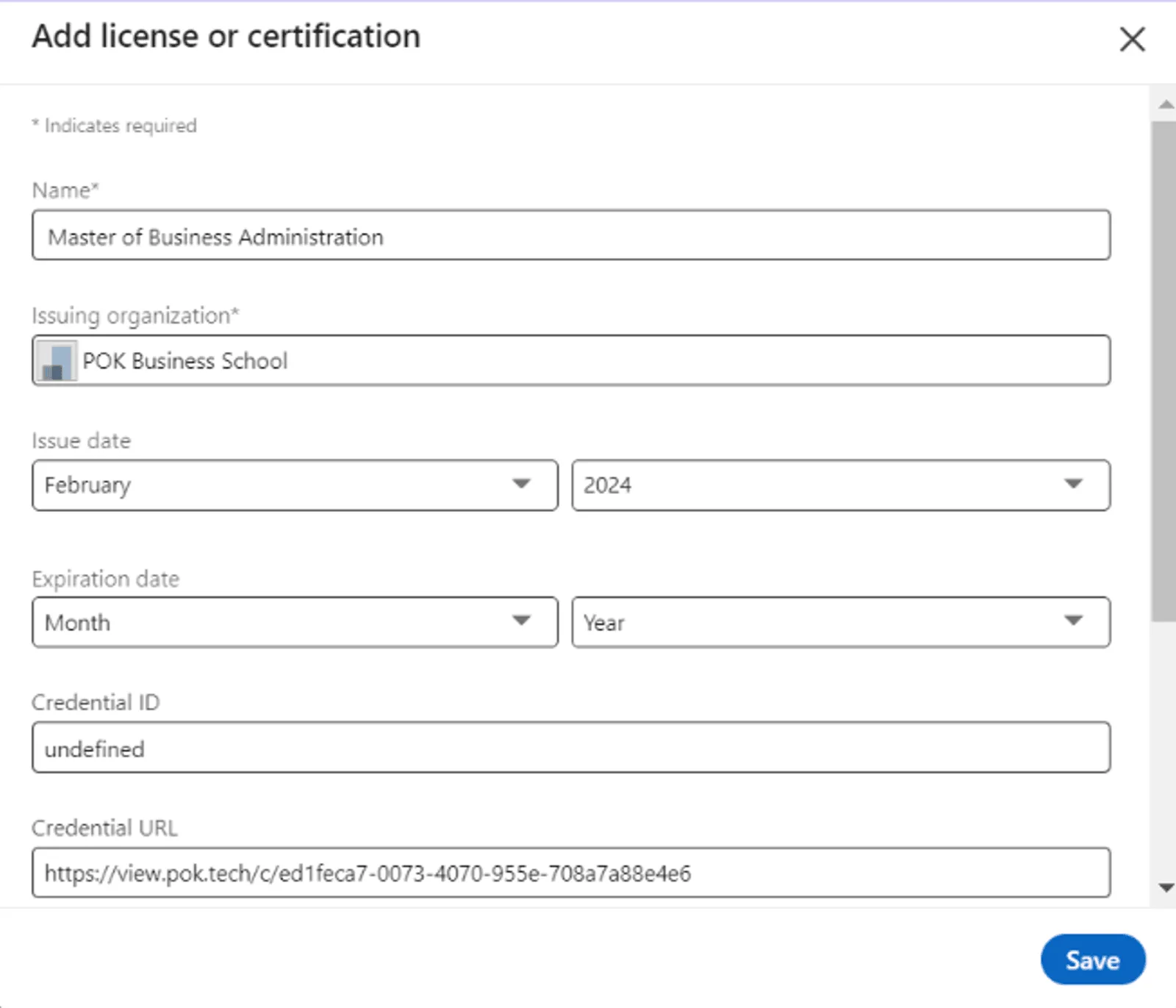
Select "Add to my LinkedIn profile". A pop-up window opens with LinkedIn's "Add LinkedIn License or Certification" section, where the certificate details are ready to save to your profile.
Other sharing options
- "Share on Linkedin" opens a pop-up window to share the certificate as a post on your LinkedIn feed.
- "Copy link" copies the certificate link so you can paste it anywhere.
- "Email" lets you send the certificate to any email address you choose.
That's it. Your achievement is ready to share with the world.
Learn more
Discover how shared credentials can become a marketing channel for your organization on the digital credentials marketing feature page.