Set Up the Domain for Your Credentials
You can display your credentials on your own subdomain, such as certificates.mycompany.com, instead of POK Proof of Knowledge's default domain. To set it up, create a CNAME record pointing to custom-domain.pok.tech in your domain provider's DNS settings, then email the subdomain to contact@pok.tech so we can activate it.
What is a subdomain and why use one?
A subdomain lets you publish your credentials under a personalized web address, for example:
certificates.mycompany.com
Instead of using POK's domain, your recipients see a URL that carries your organization's name. This builds trust and keeps your brand visible every time a credential is viewed or shared.
Create the subdomain with your domain provider
- Log in to your domain provider's dashboard. Access your account with the registrar where you purchased your domain (for example, GoDaddy).
- Open your domain's DNS settings. In the dashboard, look for the "DNS" or "Manage DNS Zone" section of the domain where you want to create the subdomain.
- Create a new CNAME record. Find the option to add a new record and fill in the fields as follows:
- Record type:
CNAME - Name / Host / Subdomain: the subdomain you want to use, for example:
certificates - Value / Target:
custom-domain.pok.tech - TTL: you can leave the default value (for example, 1 hour)
- Record type:
Do not enter the full domain in the "Name" field. Type only certificates if you want the final URL to be certificates.mycompany.com.
If your account is in the US region, point the CNAME to custom-domain.us.pok.tech instead.
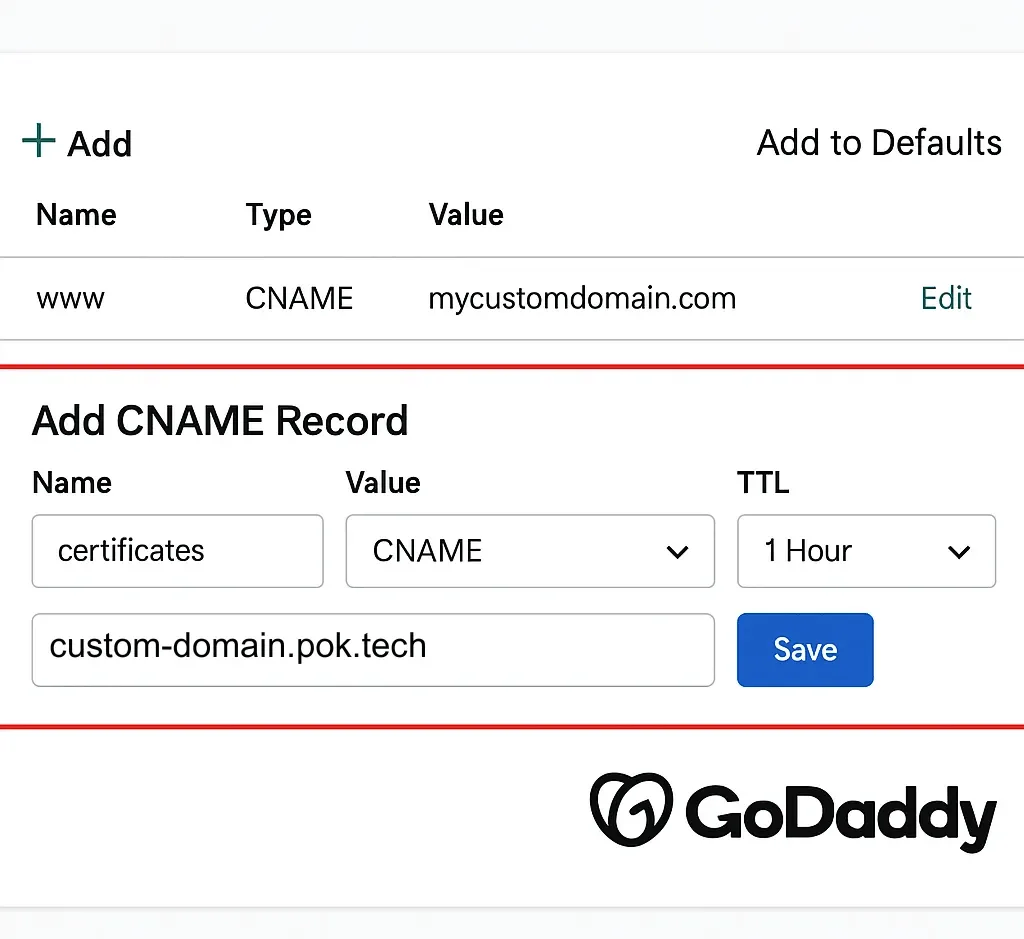
- Save the changes. Save the new record. DNS changes can take some time to propagate, depending on your provider.
- Tell POK your subdomain. Once the record is in place, email the subdomain to contact@pok.tech. We will link it to your account and activate it for you.
Customize your certificate page
Beyond the subdomain, you can also personalize the title and icon of the page where your certificates are displayed, so the whole experience matches your brand.
Need a hand?
With these settings, your credentials are not only verifiable and secure, they also reflect your institutional identity. If you need help setting up the subdomain or customizing your page, write to contact@pok.tech and our team will assist you.